
You’re probably here because you saw this video below and want quick and dirty technical info, and I have that for you, dear reader.
First off, the 3D CAD files. This took quite some time to get right, but I’m happy with how they work:

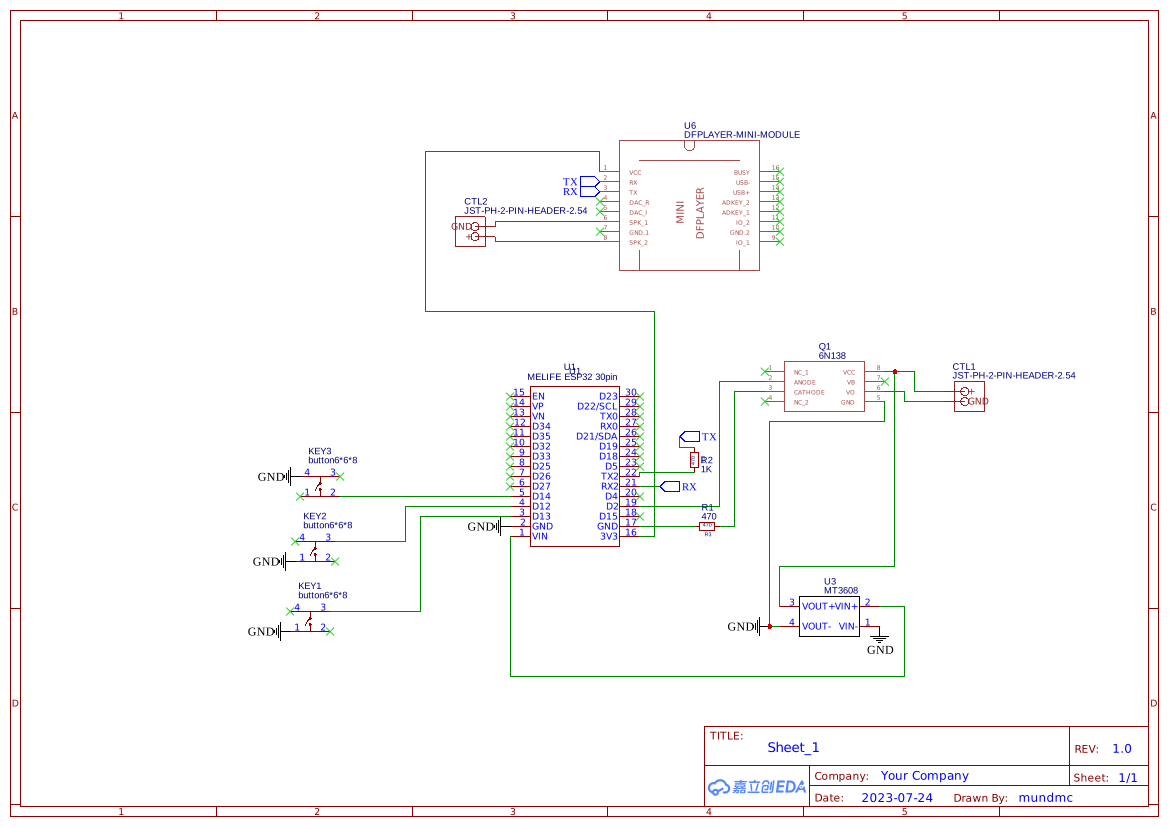
Here’s hopefully everything you need to upload to print your own PCB’s:
The code is in micropython and written to work with Indigo (my home automation platform). I’m sure it can easily be modified for Home Assistant. There are 4 files:
- config.py simply contains info to customize the units for each recipient (it will need modification)
- dfplayermini.py allows control of the micro sd card
- indigoFunc.py is purely a way to separate Indigo-specific functions from the main code
- mani.py is the main loop
config.py
WIFI_SSID = 'YOUR WIFI'
WIFI_PASSWORD = 'YOUR WIFI PASSWORD'
OWNER = 'Dan'
OWNER_ID = <<ID FOR SERVER VARIABLE>>
indigoFunc.py
#CODE BELOW IS IN MICROPYTHON

import urequests
import ujson as json

REFLECTORNAME = "USERNAME FOR INDIGO"
APIKEY = "API KEY"
VARIABLEID = VARIABLE ID USED FOR TESTING  # Indigo variable id

def updateVariable(varID, value):
    # The message to send to the Indigo Server
    message = json.dumps({
        "id": "optional-user-generated-id",
        "message": "indigo.variable.updateValue",
        "objectId": varID,
        "parameters": {
            "value": value
        }
    })
    headers = {'Authorization': 'Bearer %s' % APIKEY}
    url = 'https://%s.indigodomo.net/v2/api/command' % REFLECTORNAME
    response = urequests.post(url, data=message, headers=headers)
    reply = response.json()
    #print(reply)
    return

def readVariable(varID):
    headers = {'Authorization': 'Bearer %s' % APIKEY}
    url = 'https://%s.indigodomo.net/v2/api/indigo.variables/%s' % (REFLECTORNAME, varID)
    response = urequests.get(url, headers=headers)
    var_instance = response.json()
    #print(var_instance)
    return var_instance['value']

def main():
    print("Running main")
    # usage
    # updateVariable(VARIABLEID, "True")
    # readVariable(VARIABLEID)

if __name__ == "__main__":
    main()
main.py
import time
import machine
import network
from machine import Pin, Timer
import urequests
from indigoFunc import *
from dfplayermini import Player
import config
import urandom

isPartyID = VARIABLE ID THAT STORES THE STATUS OF ISPARTY
overrideHostID = TOO COMPLICATED TO EXPLAIN
ownerResponded = False
alertTimeout = 1
numAlerts = 0

#introMusic = 1
#yes responses = 2-25
#maybe = 26-30
#no = 31

music = Player(pin_TX=17, pin_RX=16)
music.volume(14)
led = machine.Pin(2, machine.Pin.OUT)

class LastSeven:
    def __init__(self):
        self.integers = []

    def add_integer(self, num):
        self.integers.append(num)
        while len(self.integers) > 5:
            self.integers.pop(0)
        return self.check_sequence()

    def check_sequence(self):
        return self.integers == [3, 2, 1, 3, 2]

checker = LastSeven()

wlan = network.WLAN(network.STA_IF)
wlan.active(True)
if not wlan.isconnected():
    print('Connecting to network...')
    wlan.connect(config.WIFI_SSID, config.WIFI_PASSWORD)
    while not wlan.isconnected():
        pass
print('Network connected:', wlan.ifconfig())

# setup the buttons on GPIO 13, 14, and 15
button1 = Pin(13, Pin.IN, Pin.PULL_UP)
button2 = Pin(12, Pin.IN, Pin.PULL_UP)
button3 = Pin(14, Pin.IN, Pin.PULL_UP)

debounce_time = 1000 # in milliseconds
last_press_time = {13: 0, 12: 0, 14: 0}

def button1_callback(p):
    global last_press_time
    global ownerResponded
    global checker
    now = time.ticks_ms()
    if now - last_press_time[13] < debounce_time:
        return
    last_press_time[13] = now
    this = checker.add_integer(1)
    print(this)
    print('Button 1 pressed')
    randomVal = urandom.randint(2, 25)
    print(f"Random value of {randomVal}")
    music.play(randomVal)
    if (ownerResponded==False):
        ownerResponded=True
        turnOff()
        print(f"{config.OWNER} responded {ownerResponded}")
        updateVariable(config.OWNER_ID, "yes")
    return

def button2_callback(p):
    global last_press_time
    global ownerResponded
    global checker
    now = time.ticks_ms()
    if now - last_press_time[12] < debounce_time:
        return
    last_press_time[12] = now
    this = checker.add_integer(2)
    print(this)
    print('Button 2 pressed')
    randomVal = urandom.randint(26, 30)
    print(f"Random value of {randomVal}")
    music.play(randomVal)
    if (ownerResponded==False):
        updateVariable(config.OWNER_ID, "maybe")
        turnOff()
        print(f"{config.OWNER} responded {ownerResponded}")
        ownerResponded=True
    print(type(this))
    if (this==True):
        #this part is if the person who wants to host is triggering it
        updateVariable(overrideHostID, f"{config.OWNER_ID}")
        updateVariable(isPartyID, "Override")
        ownerResponded == True
        updateVariable(config.OWNER_ID, "yes")
        partyOut(config.OWNER_ID)
    return

def button3_callback(p):
    global last_press_time
    global ownerResponded
    global checker
    now = time.ticks_ms()
    if now - last_press_time[14] < debounce_time:
        return
    last_press_time[14] = now
    this = checker.add_integer(3)
    print(this)
    print('Button 3 pressed')
    music.play(31)
    if (ownerResponded==False):
        updateVariable(config.OWNER_ID, "no")
        turnOff()
        print(f"{config.OWNER} responded {ownerResponded}")
        ownerResponded=True
    return

# set the interrupt
button1.irq(trigger=Pin.IRQ_FALLING, handler=button1_callback)
button2.irq(trigger=Pin.IRQ_FALLING, handler=button2_callback)
button3.irq(trigger=Pin.IRQ_FALLING, handler=button3_callback)

def partyOn():
    global numAlerts
    print("***function partyOn started...")
    led.on()
    print("Start Music!!!")
    music.play(1)
    numAlerts+=1
    return

def partyOut(hostId): #this is for the override function
    global numAlerts
    print("***system override message...")
    print("Start Party Out Announcement!!!")
    music.play(32) #this is the override audio
    numAlerts+=1
    return

def turnOff():
    print("***function turnOff started...")
    led.off()
    return

def partyOff():
    global ownerResponded
    global numAlerts
    print("***function partyOff started...")
    led.off()
    ownerResponded=False
    numAlerts = 0
    return

def check_status(t):
    global ownerResponded
    global alertTimeout
    global numAlerts
    global overrideHostID
    print("***fuction check_status begun")
    resp = readVariable(isPartyID)
    print("read variable")
    print(resp)
    print(type(resp))
    if resp=="False":
        partyOff()
        return
    if(ownerResponded or numAlerts > alertTimeout):
        return
    if resp=="True":
        partyOn()
    if resp=="Override":
        #check the value of indigo overrideHostID
        print("***checking the value of overrideHost")
        resp = readVariable(overrideHostID)
        #call a function similar to partyOn, called partyOut
        partyOut(resp)
    print(f"{config.OWNER} responded {ownerResponded}")

# create a timer object7
timer = Timer(-1)
# schedule the timer to call check_status every minute
timer.init(period=60000, mode=Timer.PERIODIC, callback=check_status)

check_status(timer)

# main loop does nothing, all work is done in interrupts now
while True:
    pass
dfplayermini.py was written and hosted at https://github.com/lavron/micropython-dfplayermini
Almost forgot the materials and links…
Spastix https://amzn.to/3Rg7AY8
Rubber Feet https://amzn.to/40TrTOi
6N138 Optoisolartors https://amzn.to/3QNCjdK
Esp32 https://amzn.to/3GiCbya
Hiletgo mp3 Player https://amzn.to/47QS8XQ
MT3608 Boost Converter https://amzn.to/49UexFK
12V LEDs https://amzn.to/40WVq9U
Gikfun Speaker https://amzn.to/3MVlAEk
50mm diameter 40mm focal fresnel lens https://amzn.to/3uzQHPl
This is rushed and sloppy, but I want to get the video up and i needed to post the resources first. Thanks for making it this far!